
Coordinating a group trip is exciting—and chaotic. Flights, check-ins, meet-ups, split duties, and “where is everyone?” messages quickly stack up. The right tools make a huge difference: shared itineraries, location visibility, and a single source of truth. After testing a range of options, here are the best group travel planner apps for friends and families—and why one all-in-one hub stands out.
1. ClanPlan
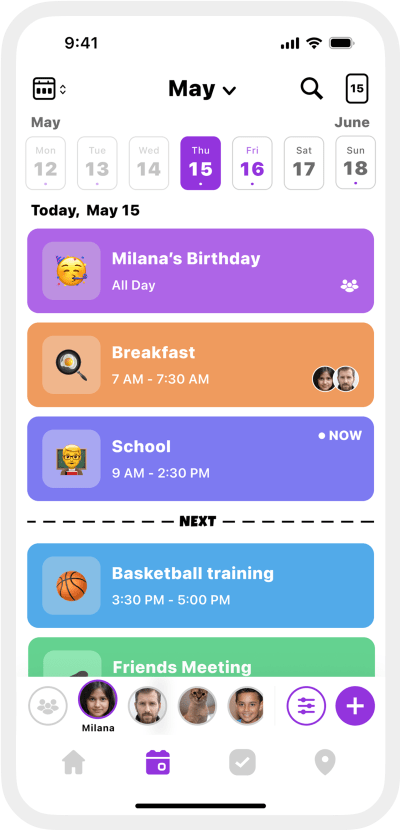
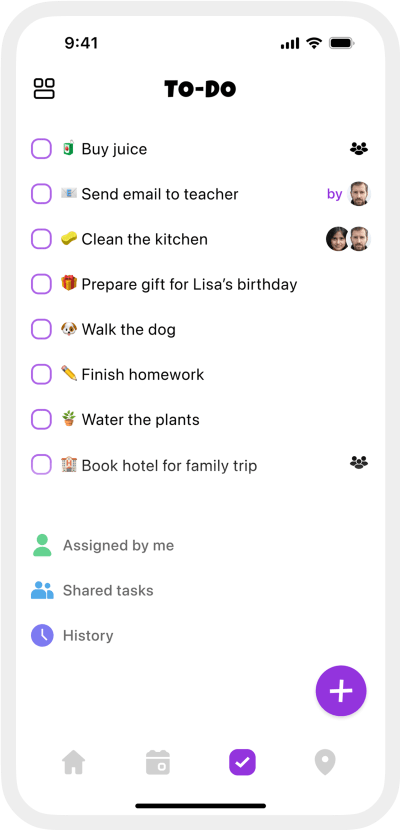
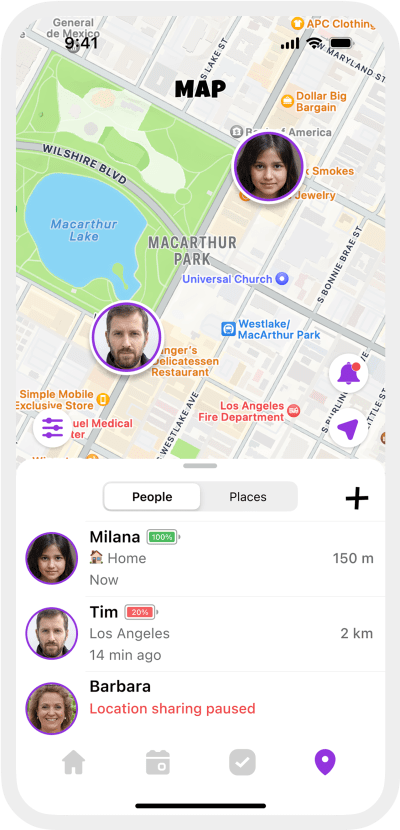
ClanPlan is a modern organizer for groups that blends a shared trip calendar with real-time location sharing, private chat, smart to-dos, and place alerts—ideal for coordinating meet-ups, museum slots, beach days, and dinner reservations without juggling five separate apps.
✅ Pros:
- Shared itinerary calendar with color-coded categories and reminders
- Live location & place alerts for meet-ups (hotel, venue, trailhead)
- Private chat with end-to-end encryption
- Smart to-dos with assignments, due dates, notifications
- Saved places for trip pins; quick jump from plan → map
- Widgets and quick actions for “today’s plan”
- All-in-one hub: calendar, tasks, chat, places—fewer separate apps
❌ Cons:
- iOS only (Android in development)
- Some advanced features require Premium
2. Wanderlog
Wanderlog is a popular group itinerary builder with maps, lists, and collaborative editing—great for planning routes and saving places together.
✅ Pros:
- Visual trip timeline and map-based planning
- Collaborative lists and notes for the whole group
- Good for road trips and multi-city routes
❌ Cons:
- No built-in live location or place alerts
- Chat isn’t central—discussion splits across apps
- Offline details can require prep and paid tiers
3. TripIt
TripIt organizes bookings by forwarding confirmations, creating a clean master itinerary. It’s excellent for flight and hotel aggregation.
✅ Pros:
- Auto-builds itineraries from emails
- Gives a reliable master view across bookings
- Handy travel details in one place
❌ Cons:
- Limited real-time group coordination features
- No shared task assignments or trip chat
- Live flight extras are behind a paywall (Pro)
4. Splitwise
Splitwise handles shared expenses and IOUs so groups don’t have to calculate who owes what after every meal or taxi ride.
✅ Pros:
- Simple, trusted expense tracking for groups
- Supports uneven splits, percentages, and currencies
- Export and settle-up convenience
❌ Cons:
- Separate app from your itinerary and chat
- Receipts and advanced features can feel manual
- No location or scheduling tools
5. Google Maps
Google Maps is essential for saved lists, directions, and live location sharing—especially useful when the group splits up and reconvenes later.
✅ Pros:
- Saved lists and starred places sync across devices
- Reliable directions and transit info worldwide
- Temporary live location sharing is convenient
❌ Cons:
- Not a planner—no shared tasks or event reminders
- Location sharing is time-limited and separate from chat
- Collaborative editing can be clunky for big groups
6. WhatsApp
WhatsApp is the world’s default group chat—great for quick coordination, voice notes, and dropping live locations in the moment.
✅ Pros:
- Everyone already uses it—zero onboarding
- Easy live location sharing in a pinch
- Media, voice notes, and pinned messages
❌ Cons:
- Itinerary and tasks disappear in chat scroll
- No calendar, reminders, or place alerts
- Hard to keep decisions organized for larger groups
7. Airbnb
Airbnb is useful for group stays with shared wishlists, split costs (in some regions), and messaging hosts—handy during planning and on arrival.
✅ Pros:
- Shared wishlists for deciding on stays
- Messaging with hosts keeps logistics together
- Group-friendly filters and amenities
❌ Cons:
- Not a trip planner—no tasks or meet-up alerts
- Expense splitting isn’t universal and can be limited
- Navigation and live location require other apps
Why ClanPlan Stands Out for Group Trips
Most travel apps do one slice of the job: chat, map, or bookings. ClanPlan goes further by turning the group plan into one living itinerary everyone can see and act on—where to be, when to meet, and what needs doing—without hunting through threads.
- Meet-up clarity: Live location plus place alerts (“Arrived at the trailhead”) make rendezvous smoother—no spammy check-ins.
- Real itinerary, not a chat log: Calendar blocks for flights, check-ins, tours, and dinner; reminders keep the day flowing.
- Shared responsibilities: Tasks with owners and due times (packing list, grocery run, museum tickets) reduce last-minute stress.
- Saved places → action: Pin sights and restaurants, then add them straight into the plan; jump to the map when you head out.
- Private, focused space: End-to-end encrypted chat built around the plan—no social noise, no ads.
Whether it’s a friends’ city break or a multi-family getaway, ClanPlan centralizes the moving parts so the group can spend less time coordinating and more time enjoying the trip.
Try ClanPlan — the group trip organizer that keeps everyone in sync
Replace scattered chats and spreadsheets with one private hub. Plan together, chat, share locations, and hit every meet-up on time.

Free to download • No ads
Conclusion
Wanderlog, TripIt, Splitwise, Maps, WhatsApp, and Airbnb all have a place in your toolkit. If you want a complete private space that keeps plans, people, and places aligned in real time, ClanPlan is the most compelling choice for group travel.
From airport meet-ups to late-night dinners, ClanPlan helps friends and families stay organized, connected, and on time—together.